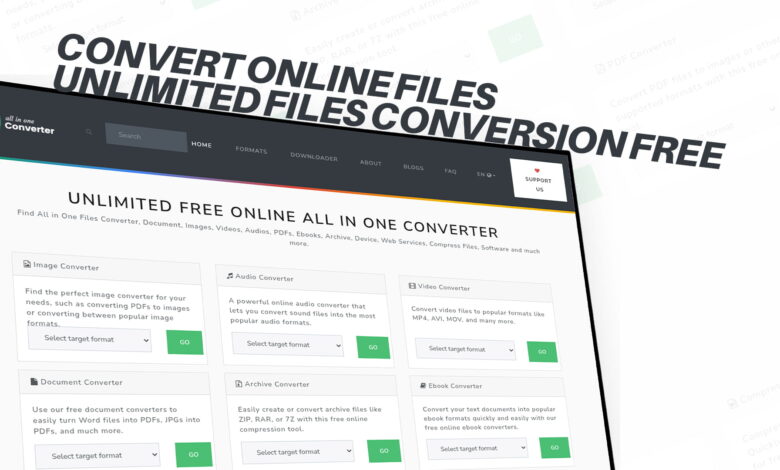

Have you ever been in a situation where you needed to open a file, but your device just would not read it? Or maybe you downloaded something important and realized it was in the wrong format? It happens to almost everyone, and it can be really frustrating. The good news is that there is now a simple, completely free solution that works for almost every type of file you can think of. That solution is ConvertOnlineFiles.
ConvertOnlineFiles is a free online platform that lets you convert files of all kinds without paying a single penny. Whether you need to change an image format, convert a video, turn a document into a PDF, or extract audio from a media file, this platform has you covered. The best part is that there is no limit on how many files you can convert. You can convert as many files as you want, completely free, and without needing to create an account or download any software.
In this article, we will walk you through everything you need to know about ConvertOnlineFiles, why file conversion matters in today’s digital world, and how this platform makes the whole process incredibly simple for everyone — from tech experts to total beginners.
Why File Conversion Is Important in Everyday Life
Before we dive into the details of what ConvertOnlineFiles offers, let us first talk about why file conversion is such a necessary thing in the modern world.
We live in a time where everyone uses different devices, different operating systems, and different software. A Windows user and a Mac user may struggle to share files because the formats they use are different. Someone sending a video from an Android phone may find that the receiver on an iPhone cannot play it smoothly. A student submitting an assignment may need to convert their Word document into a PDF before sending it. A musician may need to change an audio file from one format to another just to make it compatible with their editing software.
These are everyday situations that millions of people face all the time. And the common fix for all of them is file conversion. The ability to take a file in one format and change it into another format that works better for your needs is something that saves time, prevents headaches, and helps people get things done more efficiently.
In the past, converting files meant buying expensive software, waiting for long downloads, or finding complicated tools that required technical knowledge. But those days are over. Platforms like ConvertOnlineFiles have made it possible for anyone, anywhere, to convert any file in just a few clicks.
What Is ConvertOnlineFiles?
ConvertOnlineFiles is a web-based file conversion platform that is designed for everyone. It does not matter if you are a student, a professional, a small business owner, or just someone who needs to convert a file at home — this platform is built to be simple, fast, and completely free.
The platform supports a massive range of file types. We are talking about images, audio files, video files, documents, PDFs, eBooks, software files, compressed files, and more. No matter what kind of file you are working with, there is a very good chance that ConvertOnlineFiles can handle it.
One of the biggest things that sets ConvertOnlineFiles apart from other tools is that it truly offers unlimited file conversions for free. Many other online conversion tools either put a daily limit on how many files you can convert, restrict the file size, or ask you to pay for a premium plan to unlock full features. ConvertOnlineFiles does not do any of that. The service is open to everyone, and you can use it as much as you want.
There is also no need to sign up, create an account, or give away your personal information. You just visit the platform, choose your file, select the format you want, and convert it. That is it. Simple, clean, and hassle-free.
A Closer Look at What ConvertOnlineFiles Can Do
Let us now go through the different types of files that ConvertOnlineFiles supports so you can get a clear picture of just how powerful and versatile this platform really is.
Image Conversion
Images are one of the most commonly converted file types. Whether you are a photographer, a graphic designer, a blogger, or just someone who takes photos on their phone, you will often find yourself needing to change an image from one format to another.
Common image formats include JPG, PNG, GIF, BMP, TIFF, SVG, WEBP, and many more. Each format has its own strengths. For example, PNG files are great for images with transparent backgrounds, while JPG files are better for photographs because they are smaller in size. WEBP is a modern format used widely on websites because it loads faster without losing too much quality.
With ConvertOnlineFiles, you can convert between all of these image formats without any trouble. It is quick, it is accurate, and the output quality is maintained throughout the conversion process.
Audio Conversion
Music lovers, podcasters, voice artists, and content creators often need to work with audio files in different formats. The most well-known audio formats include MP3, WAV, AAC, FLAC, OGG, WMA, and M4A.
Different music players, devices, and software applications support different audio formats. For example, some older devices may only play MP3 files, while modern streaming platforms may prefer AAC or OGG. If you are editing a podcast, you may need a high-quality WAV file, but when sharing it online, you might want to compress it into an MP3.
ConvertOnlineFiles makes audio conversion smooth and easy. You can take any audio file, choose the format you need, and get the converted file ready in no time. This is perfect for musicians, podcasters, DJs, and anyone who works with sound.
Video Conversion
Video files are everywhere. From personal home videos to YouTube content, from movie downloads to social media clips, we deal with videos every single day. But not all video formats play on all devices.
Common video formats include MP4, AVI, MOV, MKV, FLV, WMV, WEBM, and more. MP4 is the most widely used format today, but many older videos or downloaded content may come in AVI or MKV format, which some devices struggle to play.
With ConvertOnlineFiles, you can easily convert video files from one format to another. This is especially helpful if you have a video that will not play on your phone or TV and you need to change it into a more compatible format. It is also useful for content creators who need their videos in a specific format for editing or uploading.
Document Conversion
Documents are used in schools, offices, homes, and businesses every single day. Whether it is a report, a resume, a contract, a presentation, or a simple letter, documents come in many different formats.
Common document formats include DOCX (Microsoft Word), ODT (Open Document), TXT (plain text), RTF (Rich Text Format), and more. Converting between these formats is often necessary when you are working across different software or need to share a document with someone who uses a different program.
ConvertOnlineFiles supports a wide range of document conversions. You can take a Word document and convert it into a format that opens smoothly on a different word processor, or convert a plain text file into a more structured document format. The platform makes it easy to work with documents regardless of which software you or the other person is using.
PDF Conversion
PDF is one of the most trusted and widely used formats in the world. It is the go-to format for official documents, forms, reports, contracts, and more. The reason people love PDFs is that they look exactly the same on every device and cannot be easily edited.
But sometimes, you need to do the opposite. Maybe you received a PDF and need to edit its content. Or maybe you created a document and need to turn it into a PDF before sending it. ConvertOnlineFiles supports both directions — you can convert documents into PDFs, and you can also convert PDFs into other document formats.
This is incredibly useful for students who need to submit assignments as PDFs, professionals who deal with contracts and reports, and businesses that need to process and manage large amounts of paperwork.
eBook Conversion
eBooks have become extremely popular over the last decade. People all over the world read books on their phones, tablets, Kindle devices, and computers. But just like other types of files, eBooks come in different formats, and not all reading apps and devices support all formats.
Common eBook formats include EPUB, MOBI, AZW, PDF, and FB2. For example, Amazon Kindle devices primarily use AZW and MOBI formats, while most other eBook readers and apps use EPUB. If you download an eBook in one format and your reader does not support it, you are stuck — unless you can convert it.
ConvertOnlineFiles allows you to convert eBooks between different formats so you can read them on any device you like. This means you are not limited to one platform or one device when it comes to your reading experience.
Software File Conversion
This is a slightly more technical category, but it is just as important. Software files are used by developers, IT professionals, and tech-savvy users who work with application files, executable files, and installation packages.
Different operating systems use different file formats for software. For example, Windows uses EXE files, Mac uses DMG or APP files, and Linux uses DEB or RPM packages. ConvertOnlineFiles supports the conversion of various software file types, making it a useful tool for those who need to work with software across different platforms.
Compressed File Conversion
Compressed files are used to pack multiple files into a single, smaller file, making them easier to share and store. Common compressed file formats include ZIP, RAR, TAR, GZ, and 7Z.
Sometimes you may receive a RAR file, but your computer only supports ZIP, or vice versa. ConvertOnlineFiles allows you to convert between these compressed formats so you can always access the files inside, no matter what format they arrive in.
Why ConvertOnlineFiles Stands Out
There are many file conversion tools available on the internet, so why should you choose ConvertOnlineFiles? Here are some of the key reasons why this platform is a top choice for users around the world.
Completely Free With No Hidden Costs
The first and most obvious reason is that it is 100 percent free. Not free with a trial period, not free with limited features — genuinely free. You can use it all day, every day, and you will never be asked to pay. There are no subscription fees, no premium plans you need to upgrade to, and no surprise charges.
Unlimited Conversions
Many other conversion tools put a cap on how many files you can convert per day or per month. ConvertOnlineFiles removes that restriction entirely. You can convert as many files as you need, without ever hitting a wall.
No Downloads or Installations
You do not need to download any software to use ConvertOnlineFiles. Everything happens in your web browser. This means it works on any device — your laptop, your desktop, your tablet, or your smartphone. As long as you have an internet connection and a browser, you are good to go.
Wide Format Support
The sheer variety of formats supported by ConvertOnlineFiles is impressive. Most conversion tools focus on one or two categories — maybe just images or just videos. ConvertOnlineFiles covers images, audio, video, documents, PDFs, eBooks, software files, compressed files, and more, all in one place. This makes it a one-stop solution for all your file conversion needs.
Simple and Easy to Use
The platform is designed with simplicity in mind. You do not need any technical knowledge to use it. The interface is clean and straightforward, and the conversion process is just a few steps. Even someone who has never converted a file before can figure it out in seconds.
Fast Conversion Speed
Nobody wants to wait a long time for a file to convert. ConvertOnlineFiles is built for speed. Most conversions are completed in just seconds or a few minutes, depending on the size of the file and your internet connection speed.
No Account Required
Privacy matters, and ConvertOnlineFiles respects that. You do not need to sign up, create an account, or provide any personal information to use the platform. Just visit the site and start converting.
How to Use ConvertOnlineFiles — A Step-by-Step Guide
Using ConvertOnlineFiles is incredibly easy. Here is a simple step-by-step guide to help you get started.
The first step is to open your web browser and go to ConvertOnlineFiles. Once you are on the platform, you will see clear categories for the different types of files you can convert.
The second step is to choose the type of file you want to convert. Are you working with an image? An audio file? A video? A document or a PDF? Click on the relevant category, and you will be taken to the conversion tool for that file type.
The third step is to upload your file. You can usually do this by clicking a button that says something like “Choose File” or “Upload File.” Some platforms also allow you to drag and drop your file directly onto the page.
The fourth step is to choose the format you want to convert your file into. You will see a list of available output formats. Pick the one that suits your needs.
The fifth step is to click the convert button and wait. The platform will process your file and prepare the converted version for you. This usually takes just a few seconds.
The sixth and final step is to download your converted file. Once the conversion is complete, you will see a download link or button. Click it to save the file to your device.
That is all there is to it. In just a few clicks, your file is converted and ready to use.
Who Can Benefit From ConvertOnlineFiles?
The short answer is — almost everyone. But let us look at some specific groups of people who will find this platform particularly useful.
Students need to convert files all the time. Whether it is turning a Word document into a PDF for submission, converting presentation slides, or changing the format of an image for a project, students will find ConvertOnlineFiles to be an incredibly helpful tool throughout their academic life.
Working professionals deal with documents, reports, and media files on a daily basis. Being able to quickly convert files between formats without needing expensive software can save a lot of time and make work much more efficient.
Content creators, including YouTubers, podcasters, bloggers, and social media influencers, regularly work with video, audio, and image files in different formats. ConvertOnlineFiles gives them the flexibility to work with any file type they encounter.
Small business owners often do not have the budget for expensive software tools. ConvertOnlineFiles gives them access to powerful file conversion capabilities completely free of charge, which helps them manage documents, create marketing materials, and handle all kinds of digital files without any extra cost.
Teachers and educators often need to create materials in different formats for different students and platforms. ConvertOnlineFiles makes it easy to prepare and share educational content in the right format.
Everyday users who just occasionally need to open a file that is in the wrong format will find ConvertOnlineFiles to be a lifesaver. No need to download anything or pay for anything — just visit the site and solve your problem in seconds.
The Growing Importance of Online File Conversion Tools
As the digital world continues to grow, the variety of file formats we deal with is only going to increase. New devices, new software applications, and new platforms are constantly being introduced, and they all come with their own file format preferences and requirements.
This means that file conversion is not going to become less important — it is going to become even more important. Tools like ConvertOnlineFiles are going to be a bigger part of our digital lives as time goes on.
The fact that ConvertOnlineFiles is free, unlimited, and supports such a wide range of formats makes it a platform that is truly built for the future. It is already helping millions of people around the world deal with one of the most common and frustrating problems in the digital age, and it will continue to do so for years to come.
Final Thoughts
If you regularly work with digital files — and honestly, who does not these days — then having a reliable, free, and easy-to-use file conversion tool is something you absolutely need. ConvertOnlineFiles is exactly that kind of tool. It handles images, audio, videos, documents, PDFs, eBooks, software files, compressed files, and more, all in one place.
There is no software to download, no account to create, no fees to pay, and no limit on how many files you can convert. Whether you are a student, a professional, a content creator, or just someone who needs to open a file that is in the wrong format, ConvertOnlineFiles has everything you need to get the job done quickly and easily.
Stop letting file format issues slow you down. Head over to ConvertOnlineFiles and start converting your files for free today. It is one of those simple tools that, once you discover it, you will wonder how you ever managed without it.
Techie Talks — your go-to source for the latest in technology tips, tools, and insights. For more helpful tech content, visit Techietalks.online.